Adland to Product - Why Your Art Direction Skills are a UX Goldmine
Mar 4, 2026
Tips for a seamless transition from the "Big Idea" to the "User Journey"—without losing your seniority or your salary.
Advertising taught me how to win a pitch in 30 seconds; Product Design taught me how to keep that user for 10 years. If you’re moving from the 'Big Idea' to the 'Big Problem,' you aren't starting over—you’re just translating your vocabulary.
After a decade in the industry, I’ve found that a successful pivot relies on three pillars: leveraging your Seniority, mastering Product Logic, and building Real-World Showcases that prove you can move metrics, not just pixels.
The Portfolio Pivot: From "The Big Idea" to "The User Flow"
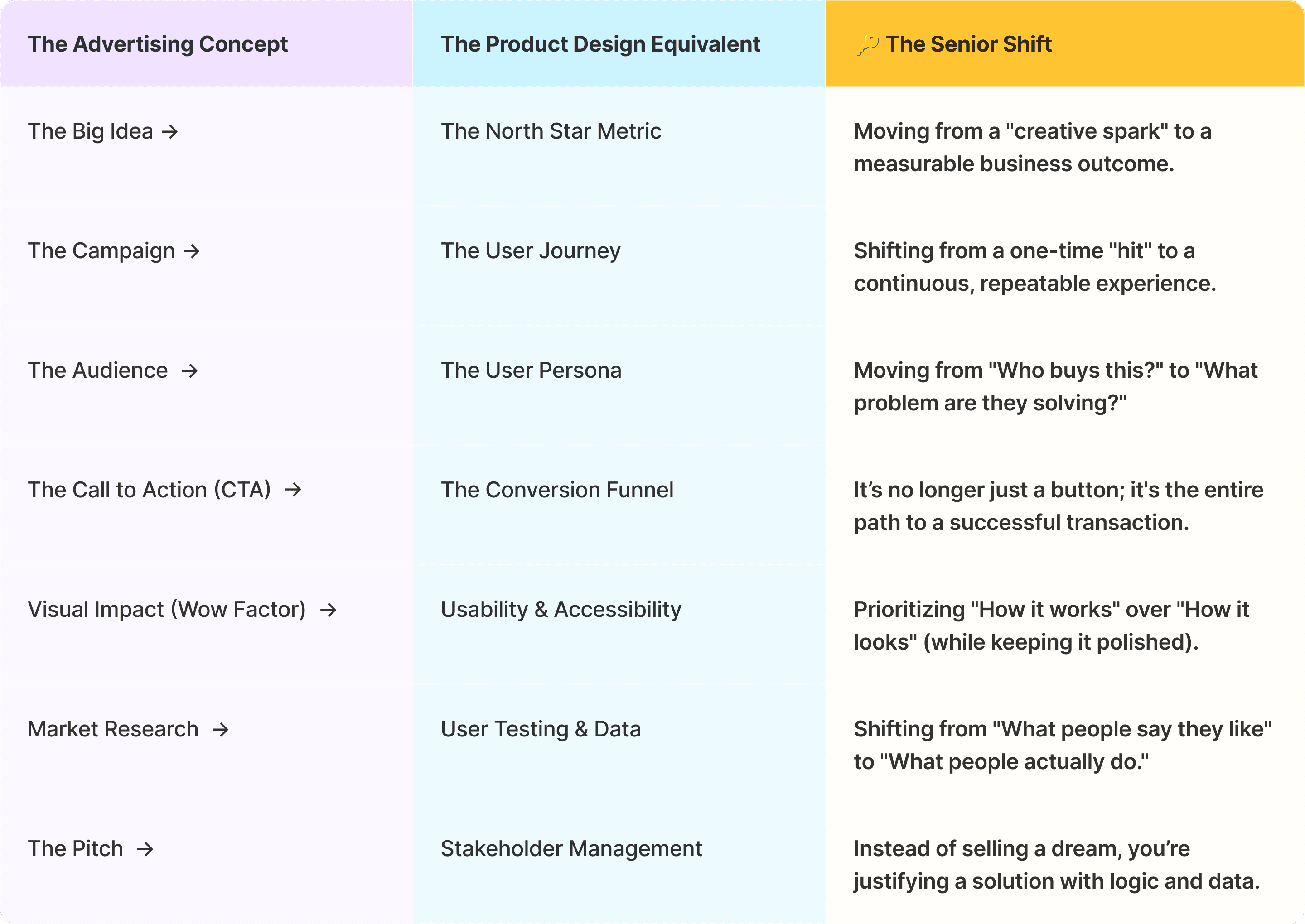
In the advertising world, the "Key Visual" is king. You spend months perfecting a single 30-second spot or a high-gloss billboard. But in Product Design, a beautiful UI is just the baseline—it’s actually the least interesting thing to a hiring manager. Leveraging Your Ad Background The secret to a successful pivot isn't deleting your old work; it’s re-labeling it. You’ll find that many of your "Creative Director" moves are actually "Product Strategy" moves in disguise. You just need to translate the vocabulary.
The Translation Guide: Adland vs. Product
Further Reading: How I created an award-winning marketing campaign with a product design mindset
Designing for Reality: The "Edge Case"
In advertising, we show the world at its best. In product, we design for the world at its worst. Stop leading with your awards and start showing your Edge Cases. A Senior Product Designer isn't just someone who designs the "Happy Path" (when everything goes right); they are the person who designs the "Error State" when the Wi-Fi cuts out or the user enters the wrong credit card.
How to Weaponize Your Seniority
You aren't a junior learning Figma; you are a veteran who knows how to solve problems. Don't hide your 10 years in Ads—weaponize them.
• Stakeholder Intuition:
In your case studies, don't just talk about colors. Talk about how you navigated conflicting feedback from clients (now stakeholders) to protect the user's experience. Juniors buckle under pushback; Seniors thrive in it.
• The "So What?" Factor:
Ad people know how to sell a "Why." Use that. Instead of saying "I made a clean dashboard," say "I designed a dashboard that reduced cognitive load by 30%, allowing users to complete tasks faster." That is Senior-level thinking.
• Cross-Functional Leadership:
Highlight your experience with copywriters and producers. In Product, this translates to collaborating with Engineers, PMs, and Data Scientists. Show that you already speak "Team," not just "Design."
The Pro-Move: Reverse-Engineer Your Past Work
If you led a global campaign for Nike, don't just show the film. Design a Nike-inspired workout tracking feature. Show how that "Big Idea" translates into a functional User Journey. Show the wireframes, the friction points, and how you solved them. This turns an "Ad Showcase" into a FAANG-ready UX Case Study that justifies your Senior title and your salary.
The Reading List: Shifting from Persuasion to Usability
In advertising, success is measured by persuasion—convincing someone to want something. In Product, success is measured by utility—helping someone do something they already need to perform. To bridge this gap, you have to "unlearn" some of your ad-brain's love for mystery and complexity.
Here is the "re-education" curriculum I recommend to every Senior Art Director making the jump:
Phase 1: Mastering the Logic of Objects
The Goal: Understand why things work (and why they don’t).
The Design of Everyday Things by Don Norman
Why it matters: This is the "Bible" of product design. It introduces concepts like Affordance and Feedback. After reading this, you’ll never look at a door handle or a digital button the same way again. It turns your "artistic eye" into a "functional eye."
Phase 2: Eliminating Cognitive Friction
The Goal: Simplify everything until the user doesn't have to think.
Don’t Make Me Think by Steve Krug
Why it matters: Ad designers often love "visual tension" and complexity. Krug argues the opposite: if a user has to think for more than a microsecond about where to click, you’ve failed. This book is the ultimate cure for "Ad-brain" clutter.
Phase 3: Navigating the "Product Machine"
The Goal: Learn how to design within a high-speed, collaborative engine.
Lean UX by Jeff Gothelf & Josh Seiden
Why it matters: Agency life is "Waterfall"—you design, you pitch, you hand off. Product life is "Agile." This book explains how to design in cycles, use MVP (Minimum Viable Product) thinking, and collaborate with engineers without losing your mind.
The "Senior" Secret: Read the Business Side, Too
If you really want to leverage your seniority, don't just read about UI. Read about Product Strategy. I highly recommend:
Continuous Discovery Habits by Teresa Torres
The Pitch: This will teach you how to talk to users to find out what they actually need, rather than what they say they want. It’s the difference between being a "pixel-pusher" and a "Product Partner."
3. The AI Self-Project: Speed-running the Learning Curve
The biggest hurdle to switching careers is the "No Experience Paradox." You need a case study to get the job, but you need a job to get the data for a case study. AI has officially solved this.
The mistake most designers make is asking AI to "design an app." That’s a Junior move. As a Senior, you should use Claude or Gemini to act as your Virtual Product Manager.
Step 1: The "Virtual PM" Prompt
Don't start in Figma. Start in a chat interface. You need a rigorous business brief to solve. Use this prompt to generate a high-level challenge:
"Act as a Lead Product Manager for a high-growth Fintech startup. We are seeing a 40% drop-off in our 'Split Bill' feature. Provide me with a Product Requirements Document (PRD) that includes user pain points, technical constraints, and the North Star Metric we need to hit. Give me three specific 'Edge Cases' I must solve for."
Why this works: You now have a "client" with real constraints. You aren't just making a pretty screen; you’re solving a documented business problem.
Step 2: Architecture with Relume & Claude
Once you have your PRD, don't guess the sitemap.
Use Relume to generate a wireframe sitemap based on your AI-generated brief.
Ask Claude to critique your user flow: "I am designing the 'Request Money' step. What are the potential friction points for a first-time user?"
Step 3: Rapid Execution in Framer
Now, move into Framer. Use the AI-layout tools to spin up a responsive structure in minutes.
The Goal: Spend 20% of your time on the layout and 80% of your time on the User Logic.
Document your process. Record a loom video or take screenshots of your "conversations" with your Virtual PM.
The Result: A "Senior-Grade" Case Study in 48 Hours
By using AI as your strategist, you aren't just showing a "Self-Project." You are showing a strategic collaboration. In your portfolio, you can honestly say:
"I acted as the Lead Designer on a simulated Fintech feature, using AI to generate data-driven constraints and PRDs to ensure the solution met specific business KPIs."
That sounds like a Senior Product Leader, not a career-changer looking for a break.
Ready to tackle your first two weeks like a pro?
Download my full Senior Designer 14-Day Onboarding Checklist
to keep these steps in your back pocket.